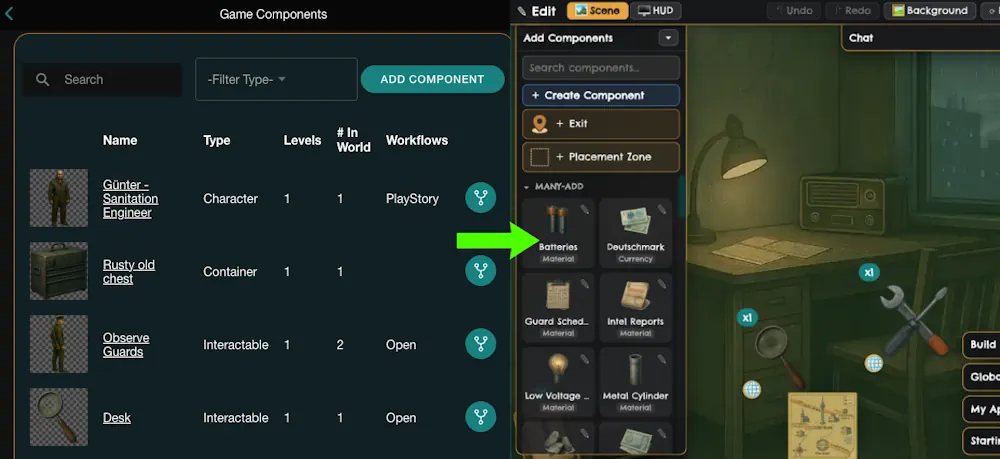
TL;DR: Meet Edit Mode
- MultiBit started out with an admin panel full of web forms. Powerful, but a steep learning curve and a real barrier for new designers.
- Edit Mode lets you build your game while you play it. Drag things into your scene, click them to set them up, and see the result right away.
- The engine underneath is exactly the same. Same components, same actions, same server calls. It's a new front door, not a new house.
- Along the way I simplified how components are set up: what it is, where it goes, and what it does.
- There were plenty of bumps, including one where the number zero caused a surprising amount of trouble.
In my last post, I talked about taking a long break and cutting scope when I came back. The whole point of cutting was to make room for something better.
This is that something: Edit Mode.
Where It Started: Web Forms
Back in December 2024, I started building an admin interface so I could create games without hand-editing a database. It was a set of web pages with forms, and it went something like this:
- Pick a component type from a long list.
- Fill out a form with its name, image, levels, and settings.
- Add "workflows," the actions a player can take with it, each with its own inputs, outputs, and requirements.
- Head over to a separate page to place it on a location.
- Launch the game to see if it actually did what you expected.
- It didn't. Go back to step 2.
It worked! You could build a full game with it. But it asked you to hold the whole game in your head while staring at forms. And if you didn't already know how the engine thought about things, it was rough going.
I tried to smooth it over. There's a commit from December 2025 where I wrote, and I quote myself here, "edit workflow restructured a bit to help with cognitive overload." Then I added a bunch of tooltips. Band-aids, basically. The forms got a little friendlier, but they were still forms.
The Idea: Build It While You Play It
What if, instead of describing your game in forms and then going to look at it, you just... stood in your game and changed it?
That's Edit Mode. You're in your actual game, looking at your actual scene. Flip on Edit Mode and you can:
- Drag new components in from a palette and drop them right where you want them
- Move, resize, and remove things that are already there
- Click anything to open a property panel and change what it does
- Add exits and travel points between locations
- Set up stories and cut scenes that play when a player interacts with something
- Edit the HUD and menus
- Undo when you mess up (you will, I do)
- Do most of it on your phone, too
And when you make a change, it shows up in the game you're playing, right away. What you see is what you get.
The Surprise: Most of It Already Existed
When I sat down to plan Edit Mode, I figured it would be a huge build. It turned out a lot of the pieces were already sitting in the admin panel.
The admin already had a drag-and-drop layout editor for placing things on a location. The server already had all the endpoints for creating and editing components. There was even a "sync" that could push config changes into a game that was already in progress. It just happened to be a manual button you had to remember to press.
So a big chunk of Edit Mode was really about bringing those admin tools into the game, and making the sync happen automatically after every change. Same engine. Same actions. Same server calls. The underlying system didn't change at all, just how you get to it.
That's the part I'm happiest about. Everything you build in Edit Mode is exactly what you'd build in the admin panel, and the admin panel is still there if you want it.
Simplifying Components: What, Where, and Does
Once I started dragging things around in the game, a bigger problem showed up. The old "pick a type" list was confusing.
Is a decorative rock a different type than a rock you can mine? Is a sword you can buy a different thing than a sword you find in a chest? Is an NPC who tells you a story a character, or something else? I built the thing and even I had to think about it.
The fix was to pull apart three questions that the old list had mashed together:
- What is it? You pick from a short list: Currency, Material, Scenery, Harvestable, Structure, Recipe, Container, Gear, Quest, or Interactable. That's it.
- Where does it go? You drag it there. Drop it in the scene, in the player's backpack, in a chest, in a shop, or in the build menu. Drop it in a shop and it becomes buyable, and Edit Mode asks you for a price. Drop it in the build menu and it asks what it costs to build.
- What does it do? Click it and set up its actions in the property panel. Harvest, produce, craft, upgrade, open, and so on.
That cleared up a lot of the confusion. A decorative rock is just a Harvestable with no harvest action. A factory is a Structure that produces something. An NPC who tells a story is an Interactable with a story attached. Fewer types, more combinations.
One principle I really like: the list is based on mechanics, not genres. A farming game designer and an RPG designer pick from the same list. What makes your game a farming game or an RPG is where you put things and what you have them do.
Bumps Along the Way
It wasn't all smooth sailing. A few highlights (lowlights?) from the commit history:
Drag and drop, again, and again
I've rewritten drag and drop more times than I care to admit. Mouse vs. touch, long press to start a drag, telling a drag apart from panning the map, dragging on a phone that also wants to scroll. My commit history has gems like "drag and drop mostly working with mouse and touch!", followed a few weeks later by "removed old drag and drop implementation," and later still, "bit of a refactor on drag event handling, keep an eye on this." Spoiler: I did have to keep an eye on it.
Zero is a number
This one's my favorite. When something hasn't been placed in a scene yet, it needs a position that means "not placed." For a while, one part of the code used 0 for that. Another part of the code saw 0,0 and thought "top left corner, got it."
You can probably guess what happened. Things that should have been waiting to be placed piled up in the top left corner of the scene instead. The fix was to use -1 for "not placed," since no real position is ever negative, and then go back and repair the affected rows across nine games.
Components that did nothing
Early on, the create wizard would happily let you make a Recipe or a Quest with no output. You'd end up with an empty shell that looked fine but didn't do anything when a player used it. Even better, making a recipe that crafts a sword turned out to be surprisingly awkward. Now, anything that has actions has to do something when you create it, and you can create a missing ingredient right there without leaving the wizard.
The flickering loading screen
Once changes synced into the game automatically, every little tweak flashed a loading screen. Nudge a tree two pixels, loading screen. Change a price, loading screen. Now the sync happens quietly in the background, and you only hear about it if something goes wrong.
Actually deleting the other layouts
Deciding to commit to one layout style was one thing. Actually ripping out the card, grouped, and isometric layout code was another. That happened in early September, and let me tell you, deleting a pile of code you no longer have to maintain feels great. Grouped placement lives on as "placement zones" inside the absolute layout, so you can still line things up in a neat area of your scene.
Same Engine, Much Better Door
Here's what I keep coming back to. The engine didn't get simpler. It still handles workflows with inputs, outputs, requirements, chances, and conditions. All of that power is still there.
What changed is that you don't have to understand all of it before you can make something. You start with "I want a tree here that drops wood" and work your way into the details when you need them. That's an order of magnitude better than where we started, and it's the first time the tool feels like the thing I pictured when I began.
Next Up: Knowing What to Build
Once building got easier, the next bottleneck showed up pretty quickly: knowing what to build, and learning how the system wants you to build it.
So I let myself have one small bit of scope creep: a very rudimentary design card system. Design cards are where you write down the big-picture stuff about your game, like your game pillars, key mechanics, story beats, and more.
In my defense, it had a purpose beyond "ooh, shiny." Design cards fed directly into my next big feature, which was all about helping designers learn the system and the builder as fast as possible. That's the next post: Skip the Docs, Ask the Agent.
Want to Build One Yourself?
I'm building this platform so that you can make simulation, story and resource management games without touching code. And now you can build them right inside the game, as you play.
If you're a creator, coach, or storyteller looking for a more powerful way to connect with your audience, or you just want to build a game without writing code, head to multibit.games to sign up for early access.
Less filling out forms, more making games!